


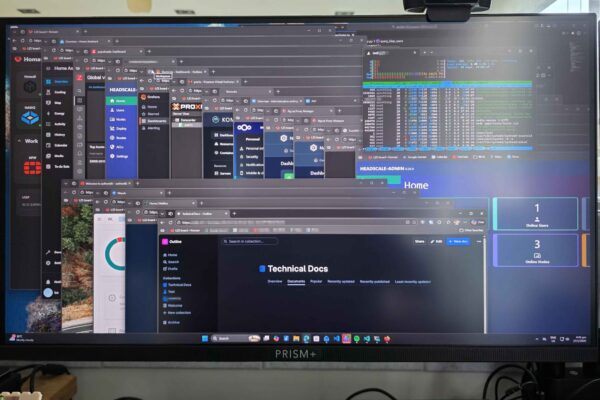
The last few months, I’ve been busy building out my HomeLab. I’m not new to self-hosting my own services, but I’ve rapidly added on quite a few more services recently. Some came about due to own personal needs, while others are slightly work-related. It’s time to share an update on the developments.
A Home Lab is a personal, self-contained IT environment at home for self-hosting various services like storage and media streaming. They often serve learning, experimentation, and exploration objectives while also actually being used by the individual and possibly family and friends.
For the longest time, I’ve hosted my own storage, using TrueNAS and NextCloud on top for cloud services similar to Dropbox and Google Drive. I posted about OwnCloud back in 2014, and FreeNAS in 2017, which preceded NextCloud and TrueNAS I currently run. I ran a Linux VM in TrueNAS (and FreeNAS previously), and from there I played with a variety of services, like hosting a test instance of this blog, run my own documentation repository using DokuWiki, and do some home automation with Home Assistant. My home lab did not need to be fancy, so for many years, things were simple.
That begun to change some time in 2025. One of the triggers was Enpass. I’ve been using Enpass since 2017. I switched to Enpass from 1Password because 1Password was leaning towards a new subscription model and leaving behind old customers like me who had been on their old perpetual licensing plan. Enpass was beginning to do the same. I am a paid Enpass user on the grandfathered plan. I did not need features that comes with their new “premium” plans, which were offered in both subscription and perpetual models. I’m perfectly happy to stay with my old plan. I did consider their new perpetual offering, but it was expensive, and who knows if they come up with yet another higher-tier plan to ask for more money.
The push, however, came when Enpass begun to ramp up the frequency of in-app advertisements of their new plans. It was starting to become seriously annoying. Then the final straw was when Enpass “threatened” there would be no more perpetual plans offered. That set me out looking for a password manager replacement. I would end up picking Bitwarden/Vaultwarden as a replacement.
That was when, along with other happenings at work, I begun to look explore many open-source projects for a variety of self-hosted services.
Vaultwarden
I decided to go with Bitwarden password manager. While it is free for personal use, it is cloud-based and you need to use Bitwarden’s servers. Fortunately, there is a solution: Vaultwarden, a free open source alternative self-hosted server implementation that Bitwarden clients can talk to. It appears that Bitwarden sanctions the Vaultwarden project since one of their employees is allowed to contribute to the project on their own time.
Bitwarden is largely similar to Enpass. Enpass has better support for additional data types, but Bitwarden’s open source nature with source code scrutinised by the security community is a big plus point. Enpass lets you store your data anywhere you choose, but although Bitwarden’s own service puts your data in their cloud, the alternative Vaultwarden server allows you to keep your data with you.
While preparing this post, I learnt there’s now also a public hosted Vaultwarden server. I suppose this could be an option if you don’t want to use Bitwarden’s servers, but you don’t want to host the server yourself either.
Komodo
My Vaultwarden instance runs in a Docker container. These days, many software come designed to support installation as Docker containers. It’s a cleaner way to manage multiple software installations without messing up your Linux host, or needing multiple Linux hosts, even if as a VM, to have clean separation between them. Over time, it may seem a slight hassle to deal with Docker commands on the CLI, so I set about looking for a GUI management system.
The first option that came up was Portainer. It has some limitations in the community edition, like max support for 3 nodes and friction with automation and GitOps. Those aren’t showstoppers for now anyway, but they could be something I need in future. The greater problem for me was about the constant reminders to upgrade to the paid version. It spoils the otherwise very nice dashboard experience.

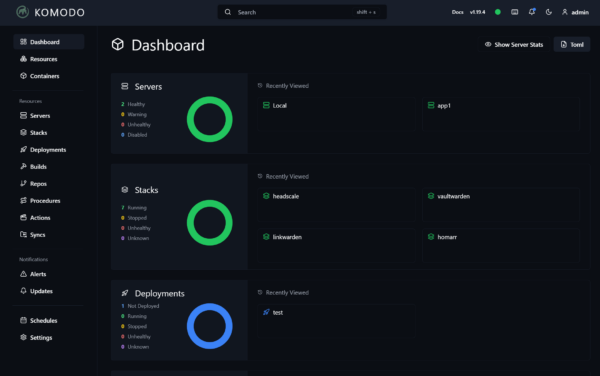
I settled on Komodo. It is more than powerful enough for my immediate need to simply manage containers and Docker Compose stacks. However, I expect to be building and deploying my own containers in future, and Komodo’s automation features will be very nice.
A side note on Docker: Try Docker and get familiar with it. These days, many software provide Docker install instructions that help automate much of the installation and configuration of not just the software itself that you need, but also its dependencies such as databases. The convenience of being able to just try any time quickly and easily, and without messing up other parts of your system will encourage you to experiment more freely.
Homarr
If you run many services in your home lab, it is very useful to have some sort of homepage/dashboard/landing page to link to all of them. Homer comes across as a popular choice. But I didn’t like that you had to configure via YAML files. It’s not that I can’t deal with YAML files, but since this isn’t something I’m going to need to modify often, it’s not worh the hassle.
I chose a popular alternative, Homarr. It’s a sleek, modern dashboard that is easy to configure.
Zabbix and Grafana
For monitoring services, network reachability, and other metrics, I use Zabbix. It’s more of an enterprise solution than for home labs, but I’m already familiar with it since I use it at work, so I decides to run this in my home lab too. Zabbix is really powerful. At work, my Zabbix system comprises multiple servers collecting about 40K data points.
Zabbix has a decent UI. But wanting something more modern, I also installed and self-host Grafana. Grafana has richer visualisation features and can also integrate additional data sources.

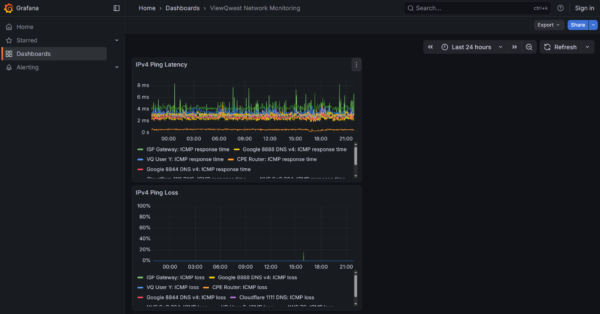
After persistently experiencing connectivity problems on my ISP ViewQwest, I now run a series of network reachability tests to collect latency and loss data for graphing and trending in both Zabbix and Grafana. The visualisation in Grafana is also shared publicly.
Proxmox
Many people use VMware ESXi hypervisor for running their virtual machines. It is now back to free for personal use, after a hiatus in 2024 and sweeping licensing changes with significantly increased licensing cost for commercial uses. I have been eyeing Proxmox.
The product is officially called Proxmox Virtual Environment, or PVE, but some people still call it Proxmox even though that’s incorrect or at best ambiguous because Proxmox is the name of a company that has several products. I will also incorrectly use the name Proxmox here.
Proxmox is a very capable virtualisation platform. I use it at work too. I only just got around to installing it for my own use last year. All the times previously I have been making do with VMs running off my NAS — first with bhyve in FreeNAS, then Qemu/KVM in QNAP, and now Qemu/KVM in TrueNAS.
I still run VMs in TrueNAS but it has fewer features as a virtualisation system because that’s not its core purpose. I also preferred another dedicated box to run some heavier workload, so I eventually got a mini-PC with Ryzen 7 5825U to serve as a Proxmox host.
Nginx Proxy Manager
I have many web services in my home lab environment. I want to be able to access them by proper hostnames and with legitimate TLS certificates. In the earlier years, I used Apache, then Nginx, with custom manual configuration alongside using Let’s Encrypt to get TLS certificates. It works, but it gets tiring once I begun to host dozens of services.
That’s where Nginx Proxy Manager comes in. It’s a friendly, web-based front-end management interface to Nginx and Let’s Encrypt, allowing easy setup of reverse proxies to backend services. It handles Let’s Encrypt TLS certificate issuance and renewals.
Tailscale and Headscale
Most of my services are setup to be publicly accessible so that it is convenient to use htem. However, I still have a need for VPN. I tried using Wireguard and OpenVPN. While it was convenient because the services were supported directly in my MikroTik router, the client-side experience wasn’t great. I still use Wireguard for site-to-site VPN. However, for the end-user VPN service, I was eyeing something nice and modern like Tailscale.
Unfortunately, I didn’t like that Tailscale did not have a self-hosted control server option. You need to use Tailscale’s cloud-based control plane. That is, until I discovered and tried out Headscale. Headscale did not have a web-based UI. For that, I needed headscale-admin.

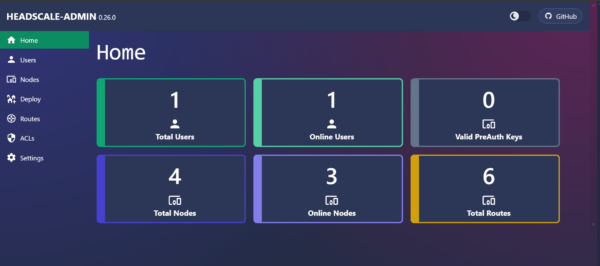
Headscale/headscale-admin with the official Tailscale client works very well. On top of providing simple connectivity between nodes over a secure virtual overlay network, you can also designate some nodes as a subnet router, exposing their connected networks to your other nodes. In fact, you can also configure a node to be an exit node, allowing other nodes to route all their traffic via the exit node to access the Internet.
Others
There are a few more services that I’ll just mention very quickly here. They aren’t less important, but they’re relatively old for me, not something I added in the last year.
Nextcloud: This is my self-host Dropbox service. My primary need is only to synchronise folders and files across a bunch of my devices. Nextcloud has grown to become so much more than just that. If you need to only synchronise folders and files, you might want to consider Syncthing.
TrueNAS: This is an open-source platform using ZFS file system to build scalable NAS systems.
Home Assistant: This is an open-source home automation system which integrates most of my smart home devices. I also have Google Home to manage those devices, but some of the more advanced automation scripting needs to be done in Home Assistant. My Home Assistant used to run on a Raspberry Pi until its SD card burnt (literally) and died.
Closing Thoughts
Self-hosting can be quite rewarding. This mostly comes from learning, as well as being able to control and manage your own services. Another important benefit is being able to own your own data.
Do bear in mind that self-hosting is not always, even not often, about cost-savings. While you do save from avoiding paying subscription fees for cloud services, but self-hosting costs your time, electricity, space, and added stress to maintain the setup. There’s also added cost if you consider catering for availability and redundancy to match that of cloud services.
With that said, go forth and try out some of these services in your own home lab!