Recently, I was getting Codex to debug a problem with the official OpenClaw client repeatedly freezing on my PC. After a day of not getting anywhere, I asked, “Why don’t you make me a new app, same concept, though my needs are much simpler.”
Before AI, I never imagined that I would be writing Windows apps. AI opens up many possibilities and opportunities. In this case, it is helping me write Windows programs. From the above prompt, I had a working prototype app running in less than 10 minutes. It was really impressive.
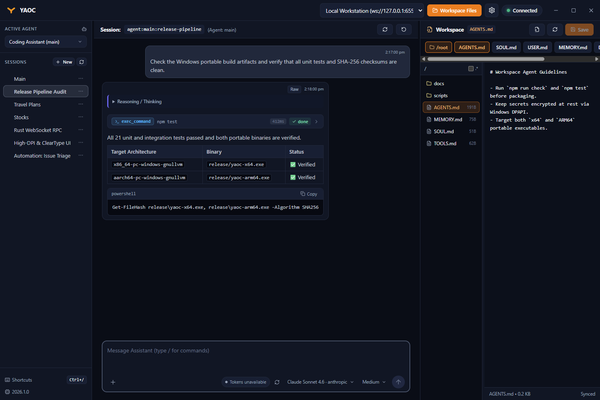
Getting a prototype working in 10 minutes, however, is one thing; turning it into a rock-solid, production-grade daily driver is quite another. What started as a quick experiment over a weekend quickly evolved into YAOC (Yet Another OpenClaw Chat, pronounced yoke), a small, lightweight, independent Windows desktop client for OpenClaw Gateways.
That first prototype was an Electron app. That was Codex’s default choice, and it worked. It also came with everything Electron comes with: a full copy of Chromium bundled into every app, a download measured in the hundreds of megabytes, and a memory footprint to match. For a chat client that I leave running all day on a laptop, that felt wrong. I don’t want a chat window to be what drains my battery.
So I changed the brief. I asked for something lightweight, with minimal impact on the machine, that would run natively on both x64 and ARM64. I use Windows on ARM laptops as well as regular x64 ones, and I did not want an app that depends on emulation on either.
What followed was one of the more enjoyable parts of the project. Codex and I discussed architecture options at length: what to run natively, what to leave to the web view, how to keep the idle cost close to zero. We ended up moving the whole thing to Tauri v2. The Gateway connection and all the heavy lifting now run in a native Rust process, while the interface is a React and TypeScript front end drawn by the WebView2 runtime that already ships with Windows 11. Nothing is bundled that Windows doesn’t already have. I had never written a line of Rust, and I’d never touched Tauri. It didn’t matter. I was the architect and Codex was my senior developer.
The efficiency work didn’t stop at the choice of framework. We kept going on memory and CPU. The release build is tuned for size. When the window is minimised, unfocused or hidden in the system tray, YAOC tells Windows to treat it as a background task, using the same efficiency mode you see in Task Manager, and it restores normal behaviour the moment you come back. The connection and streaming carry on, but the app stays out of the way of whatever I’m actually working on.
The results surprised me. The whole app is under 6 MB, as a single executable. Memory use is only about 5 MB. To put that in perspective, even Windows Task Manager uses more memory than that. So does WhatsApp. I had half expected to give up some polish for that kind of efficiency, but the app has a proper interface, with streaming chat, tool call cards, attachments, a workspace editor, themes, and keyboard shortcuts.
Building for both architectures also turned out to be easier than I expected. Both the x64 and ARM64 versions can be cross-compiled from a single PC, using Rust’s GNU/LLVM targets with LLVM-MinGW. There is no need to install Visual Studio’s C++ build tools. Getting that working took a patched copy of one dependency, so that the WebView2 loader could be embedded into the executable. I’d like to say I figured that out. I didn’t. Codex did, after a few failed builds.
Then came the hard part: the long tail. A prototype that chats is not a daily driver. A daily driver has to cope with everything that goes around the happy path. What happens when I switch sessions while another session’s history is still loading? What if the Gateway reconnects while a request is in flight? How do you make sure a late reply doesn’t land in the wrong conversation? What if I unplug a monitor, and the saved window position is now off-screen? A good number of the commits went into these unglamorous problems, such as ignoring stale responses, tracking each agent run so a notification only fires when work has truly finished, writing settings atomically so a crash can’t corrupt them, and keeping unsent drafts safe per session.
Windows has its own set of details, too. Saved tokens and the device key are encrypted with DPAPI, tied to my Windows account. The taskbar icon shows progress while an agent is working, and flashes when it needs my approval before running a command. A global shortcut brings the window up from anywhere. Even the text rendering needed attention, because one innocent-looking CSS setting quietly switches off ClearType and makes text look soft on Windows. I would never have thought to check that.
The app ships both as a per-user installer, with signed automatic updates, and as a standalone portable executable for those who prefer that. Both share the same settings. YAOC is MIT licensed, and the source is on GitHub. There is also an offline demo mode, if you want to look around without a Gateway.
I use YAOC with my own OpenClaw setup, which connects to SoCLaaS, the LLM service we run for the NUS School of Computing community (I wrote about it earlier). So YAOC is not just a side experiment for me. It is how I talk to our own self-hosted models.
Is it perfect? No. It started as something I built for myself, and it has had far less testing than software from a real team. [Add how long you’ve been using it daily, and whether the freezing is gone.] Treat it accordingly, particularly since it handles credentials and can approve commands on your Gateway.
What strikes me most is how my sense of what I can build has changed. A year ago, “write a native Windows app in a language I don’t know, for two processor architectures” would have been a project I’d never even start. Now it is a weekend experiment that turns into something I use every day. The code gets written faster than I can read it. The part that remains mine is deciding what the app should be, what “efficient” and “done” mean, and where it has to be dependable.
If you use OpenClaw on Windows, give YAOC a try and let me know how it goes.
View Comment Policy